High Availability On-Premises Deployment
Druid HA deployments leverage industry-standard Kubernetes technology. This setup is designed to handle light to moderate chat traffic, averaging 100 messages per minute, with occasional spikes up to 300 messages per minute, and no significant load on the Druid Connector.
Standard Deployment Architecture Diagram
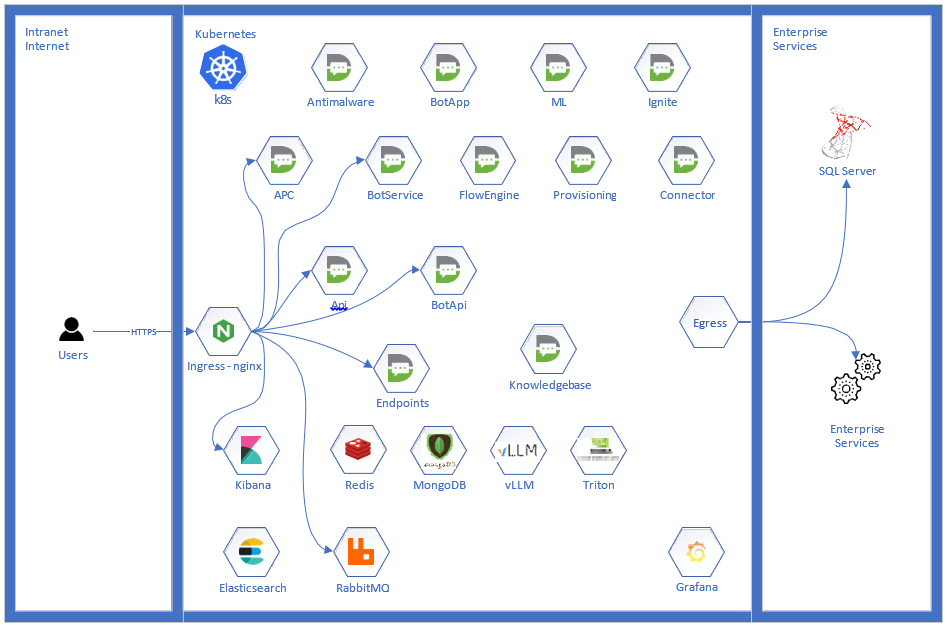
Components Description
| Name | Description | Type |
|---|---|---|
| APC Backend | Admin Portal - used for administration of AI Agent solutions, users, tenants etc. It hosts the web portal interface for AI Agent authoring and user management. | Druid |
| APC Frontend | The service that hosts the UI content of the Admin Portal. | Druid |
| API |
The conversational authorizer and live agent notification service. It exposes web sockets for Druid live agent webpage, to manage live chat notifications. It also hosts light web resources for certain chat functionality like sensitive data input, SSO auth, etc. |
Druid |
| Antimalware | The file signature checker. This component is used by druidflowengine component to verify file signature versus its extension and validate extension against supported extensions: pdf, png, jpg, jpeg, doc, docx, xls, xlsx, odt, ods, tiff, tif, mp3, mp4, mkv, webm, txt, json, csv. Also, it can be integrated with any 3rd party antimalware system which is AMSI interface compliant | Druid |
| BotApi |
Manages message statuses. Available statuses: Sent, Received, Read. |
Druid |
| BotApp | The AI Agent application. It handles all message routing between public communication channels(e.g., WhatsApp, Facebook, Viber, etc.) and the Flow Engine. It receives incoming messages from these channels, forwards them to the Flow Engine for processing, and then sends the engine’s responses back to the appropriate channel. This component ensures that every conversation reaches the right place and that replies are delivered smoothly. | Druid |
| BotService |
Acts as the message manager for the AI Agent. It serves as the primary messaging endpoint for the DirectLine channel. Public web chat clients connect to this service to send user messages and receive AI Agent responses, ensuring smooth, real-time communication between users and the conversational engine. |
Druid |
| Cognitive Services | Support library for Druid Vision. | Third-party |
| Connector | The Connector integrates the conversational engine with enterprise systems. It handles all automated activities related to data exchange between the platform and third-party applications, databases, and services. It communicates through interfaces such as REST, SOAP, SQL, MSCRM, Azure Blob Storage, document generators, and file download endpoints. In addition, the Connector stores conversation transcripts in the history database. | Druid |
| Contact Center Integration | This component connects the Flow Engine with third-party contact center solutions. It enables seamless handover, escalation, and data exchange with platforms such as Oracle B2C, Amazon Connect, Freshchat, Salesforce, and others. | Druid |
| Dashboard | Offers real time metrics of the live chat functionality to the portal's UI (APC). | Druid |
| Data Service | Druid’s proprietary solution for storing conversational context. It persists Druid entity records created and managed within the Druid AI Platform, simplifying the authoring, management, and retrieval of these records. | Druid |
| Elasticsearch | Elasticsearch is used for log storage. It serves as a time-series database that collects and indexes logs from all DRUID applications, enabling efficient search, analysis, and monitoring. | Third-party |
| Endpoints | Endpoints provide the integration layer for external applications to interact with the DRUID conversational engine. This component hosts APIs that allow third-party systems—such as RPAs, electronic signature solutions, and other applications—to start and manage flows within the conversational engine. | Druid |
| FlowEngine | The core dialog management engine responsible for executing configured conversation flows. It manages all chat sessions, ensuring that user interactions follow the defined dialogs and respond appropriately throughout the conversation. | Druid |
| Grafana | Grafana provides dashboards for monitoring and analysis. It offers a graphical interface to explore key performance indicators (KPIs) and visualize metrics from Druid. | Third-party |
| Ignite | A persistent caching solution for the conversational engine. It is primarily used to manage and store conversation-related user data efficiently, ensuring fast access and improved performance. | Third-party |
| Kibana | A web application for investigating logs. It provides a user-friendly interface to explore and analyze technical logs from DRUID applications, which are stored in the Elasticsearch database. | Third-party |
| Knowledge Base API | Acts as a proxy between knowledge base services and their clients. It forwards requests from the FlowEngine and APC to the Knowledge Base Agent and Connector, ensuring smooth communication and data retrieval. | Druid |
| Knowledge Base Agent | The core knowledge base engine. It handles all knowledge base operations, including web crawling, document extraction, embedding, training, and prediction. | Druid |
| ML API Gateway | Acts as a proxy between machine learning services and their clients. It forwards requests from the FlowEngine and APC to ML Model Serving and ML Model Training components, enabling seamless access to ML capabilities. | Druid |
| ML Model Serving | Handles NLU prediction requests. It acts as an active NLP engine, providing responses to intent and entity predictions based on the NLU models trained and supplied by the ML Model Training component. | Druid |
| ML Model Training | ML Model Training creates NLU models using training phrases provided by the APC. These models are then used by ML Model Serving to handle intent and entity predictions in conversations. | Druid |
| MongoDB | The database for the Knowledge Base Agent and Dataservice, storing and managing data required for knowledgebase operations and conversational context. | Third-party |
| Nginx | Manages inbound traffic to the Druid AI Platform. It serves as the primary entry point, handling all external requests and directing them to the appropriate platform components. | Third-party |
| Prometheus | Collects and stores metrics from DRUID applications. It maintains a time-series database that is continuously updated, enabling monitoring and performance analysis. | Third-party |
| Provisioning | Manages the setup of AI Agent-related resources. It handles AI Agent creation, channel configuration, and the export or import of authored elements such as dialogs, integrations, and entities. | Druid |
| RabbitMQ | The message broker that enables intercommunication between Druid applications. It uses the AMQPS protocol to ensure secure and reliable message delivery. | Third-party |
| Redis | Serves as an in-memory data store and cache for Druid applications. It supports fast data access, multi-instance synchronization for high availability, and internal notifications across the platform. | Third-party |
| Service Gateway | Acts as a proxy between the Knowledge Base Agent and embedding servers (e.g., Triton). It exposes embedding services “as a service” to requesting clients, such as the KB Agent and ML Model Serving, enabling seamless integration and access. | Druid |
| SIP Host | Serves the VoIP integration with telephony contact center solutions. Handles the signaling part of the connection. | Druid |
| SIP Mediaserver | Serves the VoIP integration with telephony contact center solution. Handles the media transfer & processing, and the integration with speech providers. | Druid |
| Triton | Triton AI, powered by NVIDIA, generates semantic embeddings used by ML and Knowledge Base services for natural language understanding and data representation. | Third-party |
| Webview | Hosts the interface for Conversational Business Applications (CBAs). | Druid |
| Vision | The Optical Character Recognition (OCR) module. It extracts text and relevant data from a variety of document types for further processing within the platform. | ruid |
| vLLM |
Generative AI server. It works with the Druid Knowledge Base service to generate completions and enhanced responses based on knowledge base content. |
Third-party |
H/W and S/W requirements - Non-Cloud Specifications
Production Environment
| # | Item | Qty (Nodes) | OS | vCPU | RAM (GB) | SSD (GB) | Data (GB) | Notes |
|---|---|---|---|---|---|---|---|---|
|
1 |
App Server - The host of the Druid AI Platform |
61 |
Linux min kernel 3.10 i.e., Ubuntu 18.04 LTS, RedHat 7.4 (newer, equivalent) |
8 |
32 |
OS 120 |
250 |
Kubernetes Cluster (min version 1.19) |
| 2 | App Server - Druid VoIP | 32 |
Linux min kernel 3.10 i.e., Ubuntu 18.04 LTS, RedHat 7.4 (newer, equivalent) |
2 |
8 |
OS 120 |
- |
Kubernetes Cluster (min version 1.19) |
|
3 |
App Server – Druid semantic classification machine |
1 |
Linux min kernel 3.10 i.e., Ubuntu 18.04 LTS, RedHat 7.4 (newer, equivalent) |
4 |
8 |
OS 120 |
50 |
NVIDIA 16 GB GPU with compute capability 7.5 (e.g., T4, V100, P100) |
|
4 |
App Server – LLM Service for Gen.AI |
1 |
Linux min kernel 3.10 i.e., Ubuntu 18.04 LTS, RedHat 7.4 (newer, equivalent) |
16 |
128 |
OS 120 |
512 |
NVIDIA H200 141GB GPU3 |
| 5 | Dedicated storage - container and infrastructure storage | 100 | NFS - Dedicated or shared | |||||
|
6 |
DB server - MS SQL server |
1 |
Windows 2019+; Updates “up to date” |
4 |
16 |
OS 120 |
400 |
Microsoft SQL Server 2019+ (Dedicated or shared) |
1 These specifications apply only to worker nodes. Control-plane node requirements are detailed in the Kubernetes deployment documentation, which is outside this document scope.
2 These nodes will be dedicated to Druid VoIP applications and should be externally accessible, for example through a public IPaddress. The hardware requirements do not include the hosting of speech services (STT, TTS, STS); those services require a dedicated infrastructure, if hosted on-premise, and are provider dependent.
3 Depending on user load, model selected or required response time requirements may scale for example 4 NVIDIA H200 141GBGPUs hosting 32B model for 5-600 TPS. These hardware requirements are subject to rapid change as models evolve and user loadincreases.
Testing Environment
| # | Item | Qty (Nodes) | OS | vCPU | RAM (GB) | SSD (GB) | Data (GB) | Notes |
|---|---|---|---|---|---|---|---|---|
|
1 |
App Server - The host of the Druid AI Platform |
1 |
Linux min kernel 3.10 i.e., Ubuntu 18.04 LTS, RedHat 7.4 (newer, equivalent) |
12 |
48 |
OS 120 |
100 |
Kubernetes Cluster (min version 1.19) |
| 2 | App Server - Druid VoIP | 1 |
Linux min kernel 3.10 i.e., Ubuntu 18.04 LTS, RedHat 7.4 (newer, equivalent) |
2 |
8 |
OS 120 |
- |
Kubernetes Cluster (min version 1.19) |
|
3 |
App Server – Druid semantic classification machine |
1 |
Linux min kernel 3.10 i.e., Ubuntu 18.04 LTS, RedHat 7.4 (newer, equivalent) |
4 |
8 |
OS 120 |
50 |
NVIDIA 16 GB GPU with compute capability 7.5 |
|
3 |
App Server – LLM Service for Gen.AI |
1 |
Linux min kernel 3.10 i.e., Ubuntu 18.04 LTS, RedHat 7.4 (newer, equivalent) |
8 |
64 |
OS 120 |
200 |
NVIDIA H200 141GB GPU |
|
4 |
DB server - MS SQL server |
1 |
Windows 2019+; Updates “up to date” |
2 |
8 |
OS 120 |
50 GB (Scale as required) |
Microsoft SQL Server 2019+ (Dedicated or shared) |
H/W and S/W requirements - Cloud (Azure, EKS, etc.)
Production Environment
| # | Item | Qty (Nodes) | OS | vCPU | RAM (GB) | SSD (GB) | Data (GB) | Notes |
|---|---|---|---|---|---|---|---|---|
|
1 |
App Server - The host of the Druid AI Platform |
6 |
Cloud specific |
8 |
32 |
Cloud specific |
- |
Kubernetes Cluster (min version 1.19) |
| 2 | App Server - Druid VoIP | 3 |
Linux min kernel 3.10 i.e., Ubuntu 18.04 LTS, RedHat 7.4 (newer, equivalent) |
2 |
8 |
Cloud specific |
- |
Kubernetes Cluster (min version 1.19) |
|
3 |
App Server – Druid semantic classification machine |
1 |
Cloud specific |
4 |
8 |
Cloud specific |
- |
NVIDIA 16 GB GPU with compute capability 7.5 (e.g., T4, V100, P100) |
|
4 |
App Server – LLM Service for Gen.AI |
1 |
Cloud specific |
16 |
128 |
Cloud specific |
- |
NVIDIA H200 141GB GPU
|
|
5 |
DB server - MS SQL Server |
1 |
Windows Server 2019+; Updates “up to date” |
4 |
16 |
OS 120 GB |
400 (Scale as required) |
Microsoft SQL Server 2019+ (Dedicated or shared) |
|
6 |
Network disks |
- |
- |
- |
- |
- |
950 (Scale as required) |
Cumulated for the entire platform. |
Testing Environment
| # | Item | Qty (Nodes) | OS | vCPU | RAM (GB) | SSD (GB) | Data (GB) | Notes |
|---|---|---|---|---|---|---|---|---|
|
1 |
App Server - The host of the Druid AI Platform |
1 |
Cloud specific |
12 |
48 |
Cloud specific |
- |
Kubernetes Cluster (min version 1.19) |
| 2 | App Server - Druid VoIP | 1 |
Linux min kernel 3.10 i.e., Ubuntu 18.04 LTS, RedHat 7.4 (newer, equivalent) |
2 |
8 |
Cloud specific |
- |
Kubernetes Cluster (min version 1.19) |
|
2 |
App Server – Druid semantic classification machine |
1 |
Cloud specific |
4 |
8 |
Cloud specific |
- |
NVIDIA 16 GB GPU with compute capability 7.5 (e.g., T4, V100, P100) |
|
3 |
App Server – LLM Service for Gen.AI |
1 |
Cloud specific |
8 |
64 |
Cloud specific |
- |
NVIDIA A100 80GB GPU |
|
4 |
DB server - MS SQL Server |
1 |
Windows Server 2019+; Updates “up to date” |
2 |
8 |
OS 120 |
50 (Scale as required) |
Microsoft SQL Server 2019+ (Dedicated or shared) |
|
5 |
Network disks |
- |
- |
- |
- |
- |
350 GB (Scale as required) |
Cumulated for the entire platform. |
DRUID Platform DB Server - Additional software requirements
- OS: Windows Server 2019+ (or newer) - updates "up-to-date"
- SQL Server (or newer) instance with the following characteristics:
- Collation: Latin1_General_CI_AS
- Windows and SQL Server Authentication mode enabled.
- TCP Protocol enabled in SQL Server Configuration Manager
- SQL Server port,
{{SQL-SERVER-PORT}}(default 1433), is open in the firewall of the DB Server. It must be a fixed port, not on a dynamically allocated one.
Detailed components CPU and memory requests and limits
| Pod Name | Mem Req. [MiB] | CPU Req. [millicores] | Mem Lim. [MiB] | CPU Lim. [millicores] |
|---|---|---|---|---|
|
ApcBack |
1536 |
500 |
4096 |
2000 |
|
ApcFront |
100 |
100 |
384 |
250 |
|
Api |
512 |
100 |
1024 |
1000 |
|
Antimalware |
512 |
100 |
512 |
1000 |
|
BotApi |
512 |
100 |
1024 |
1000 |
|
BotApp |
768 |
100 |
1536 |
1000 |
|
BotService |
512 |
100 |
1024 |
1000 |
|
Connector |
768 |
200 |
1024 |
2000 |
| ContactCenterIntegration | 512 | 250 | 1024 | 1000 |
|
Dataservice |
512 |
100 |
1024 |
1000 |
| Dashboard |
512 |
100 |
1024 |
1000 |
| Elasticsearch | 1024 | 1000 | 2048 | 1000 |
|
Endpoints |
512 |
100 |
1024 |
1000 |
|
Flow Engine |
1024 |
250 |
2048 |
2000 |
| Grafana | 512 | 300 | 1024 | 2000 |
|
Ignite |
512 |
100 |
5120 |
1500 |
| Kibana | 512 | 100 | 1024 | 500 |
|
Knowledgebase API |
512 |
100 |
1024 |
1000 |
|
Knowledgebase Agent |
3072 |
600 |
13312 |
6000 |
|
ML Api Gateway |
512 |
100 |
1024 |
1000 |
|
ML Model Serving |
512 |
100 |
2048 |
1000 |
|
ML Model Training |
2048 |
500 |
4096 |
2000 |
|
Migrator |
Best Effort |
|||
| MongoDB | 2048 | 250 | 2048 | 1000 |
| MS Cognitive Services | 8192 | 2000 | 8192 | 4000 |
| Nginx | 90 | 100 | ||
|
Prometheus Node Exporter |
Best Effort |
|||
|
Prometheus Server |
Best Effort |
|||
|
Provisioning |
512 |
50 |
1024 |
400 |
|
RabbitMQ |
2048 |
1000 |
2048 |
1000 |
|
Redis |
256 |
200 |
1024 |
1000 |
|
Service Gateway |
512 |
100 |
1024 |
1000 |
| Triton Models | Best Effort | |||
|
Triton Server |
512 |
100 |
6144 |
3500 |
| Vision | 512 | 100 | 4096 | 1500 |
|
Webview |
512 |
100 |
1024 |
1000 |
| vLLM Model | Best Effort | |||
| vLLM | 10240 | 1000 | 16384 | 4000 |
Specific components need
In the table below, 'T' stands for the Testing environment and 'P' stands for the Production environment. The listed values represent the required base size for the respective PVCs (Persistent Volume Claims), which may vary depending on project requirements.
| Component | Storage Class RWO | Specifications RWO | Storage Class RWO | Specifications RWX | Ingress | Load Balancer | Special configuration / requirements |
|---|---|---|---|---|---|---|---|
|
nginix/traefik/ other |
No |
- |
No |
- |
No |
Yes |
- |
|
rabbitmq |
Yes |
T: 5 GB P: 30 GB |
No | - |
Yes |
No |
- |
|
redis |
Yes |
T: 1 GB P: 30 GB |
No | - |
No |
No |
sysctl -w net.core.somaxconn=10000
|
|
elasticsearch |
Yes |
T: 10 GB P: 30 GB |
No | - |
No |
No |
For OpenShift, read the Redhat documentation. |
| mongodb | Yes |
T: 10 GB P: 30 GB |
Yes |
T: 25 GB P: 100 GB |
No |
No |
Follow the post-installation instruction provided by |
|
kibana |
No |
- |
No | - |
Yes |
No |
- |
| grafana | Yes |
T: 2 GB P: 10 GB |
No | - |
Yes |
No |
- |
| prometheus | Yes |
T: 12 GB P: 35 GB |
No | - |
No |
No |
- |
| triton | Yes |
T: 30 GB P: 30 GB |
No | - |
No |
No |
- |
| vllm | Yes |
T: 200 GB P: 200 GB |
No | - |
No |
No |
- |
|
druid apps |
Yes |
T: 5 GB P: 30 GB |
Yes |
T:100 GB P: 250 GB |
Yes |
No |
- |
Applications’ Technical Users
| Application | User | Notes |
|---|---|---|
| APC Backend |
admin |
Used for platform administration. |
| APC Backend |
|
Used for programmatic access to platform API. Password parameter: |
|
RabbitMQ |
|
Used for queues admin. Main usage is for troubleshooting. Password parameter: |
|
Kibana |
|
Used for logs exploring, mainly troubleshooting. Password parameter: |
|
BotApp BotService |
- |
Only password. Bot App uses it to authenticate with Bot Service (two of the Druid components). It cannot be used from outside. Parameter: |
|
Redis |
- |
Only password. It cannot be used from outside. Parameter: |
|
Endpoints |
- |
Only password. Parameter: |
Network Communication Matrix
| Source (Name, IP, URL, etc.) | Destination (Name, IP, URL, etc.) | Protocol | Port | Function | Used For |
|---|---|---|---|---|---|
|
App Server3 |
druidcontainerregistry.azurecr.io |
HTTPS |
443 |
Druid Container Registry |
Installation |
| App Server3 |
api.dso.docker.com api.segment.io auth.docker.io cdn.auth0.com cdn.segment.com desktopdocker.com docker-pinata-support.s3.amazonaws.com docker.elastic.co hub.docker.com k8s.gcr.io login.docker.com mcr.microsoft.com notify.bugsnag.com nvcr.io production.cloudflare.docker.com quay.io registry-1.docker.io registry.k8s.io sessions.bugsnag.com |
HTTPS |
443 |
Third-party Containers |
Installation |
|
WebApp (public) |
druidapcback.{{domain}}4 druidapcfront.{{domain}} druidapi.{{domain}} druidbapi.{{domain}} druidbotservice.{{domain}} |
HTTPS |
443 |
AI Agent interaction |
Utilization |
|
Intranet5 |
druidapcback.{{domain}} druidapcfront.{{domain}} druidapi.{{domain}} druidbapi.{{domain}} druidbapp.{{domain}} druidbotservice.{{domain}} druidendpoints.{{domain}} grafana.{{domain}} kibana.{{domain}} rabbitmq.{{domain}} |
HTTPS |
443 |
Platform administration |
Utilization |
|
App Server (druidconnector) |
<TBD> |
<TBD> |
<TBD> |
Enterprise Services |
Utilization |
3 This entry is necessary at installation or upgrade time for Kubernetes engine to automatically download needed binaries.
4 If you don't want to expose the druidapcback component, some specific files must be downloaded and made accessible as resources to the WebApp. The Druid team will provide the necessary list. There is only one downside: the files must be copied to WebApp within any DRUID Platform’s upgrade process.
5 Dedicated names for Intranet access only can be accommodated; this will require additional certificates.
DNS entries
DNS registration of Druid Services FQDNs. Please register in your DNS and provide us with the list of the following FQDNs (example provided for the first few, please extrapolate for the rest).
| Domain | Type | Name | Value (IP addresses) | FQDN |
|---|---|---|---|---|
|
|
A |
ApcBackend |
|
apcbackend.example.com |
|
APCFrontend |
apcfrontend.example.com | |||
|
API |
api.example.com | |||
|
BotAPI |
botapi.{{domain}} | |||
|
BotApp |
botapp.{{domain}} | |||
|
BotService |
botservice.{{domain}} | |||
| EndPoints | endpoints.{{domain}} | |||
| Kibana | kibana.{{domain}} | |||
|
RabbitMQ |
rabbitmq.{{domain}} |
SSL Certificate
To access Druid AI Platform via HTTPS protocol, SSL certificate(s) must be prepared. The certificate(s) must cover all names defined in section “DNS Entries” documented above.
You can provide one or more certificates. The following approaches are valid for the Druid AI Platform use case (we strongly recommend the last two options):
- Multiple certificates- one certificate for each service in the list of names.
- A single certificate with multiple hosts (Common Name or Subject Alternative Names).
- A wildcard certificate.